In short
Switching from Pipedrive to Lumo runs through an import wizard in six steps. A trial run reads everything from Pipedrive and writes nothing. Deals, people, organisations, activities, notes and custom fields come across. Files, Pipedrive automations and integrations with other tools do not. After the import you choose whether Lumo becomes the source, or Pipedrive stays the source for now.
Source: lumoheaven.com/en/switch-from-pipedrive, checked on 16 November 2026.As of: 16 November 2026
In this article
- Should you switch from Pipedrive at all?
- What comes across from Pipedrive, and what does not?
- How does the import wizard run?
- What happens to your Make scenarios and CloudTalk?
- Does my email history come across?
- Lumo as the source, or does Pipedrive stay the source?
- Clean up duplicates first
- The playbook for the switch
- How long does a switch take?
- Do it yourself or outsource it
- Frequently asked questions
Should you switch from Pipedrive at all?
Often not. Pipedrive is a good CRM for sales, and we are a Platinum Partner ourselves. If your team only works a pipeline and your integrations hold up, a switch gains you little.
The reason to move to Lumo usually sits next to sales. Support runs in a separate helpdesk, the newsletter in a separate mail tool and quotes in a separate signing service. Each tool keeps its own version of the customer. In Lumo, pipeline, quotes, helpdesk and campaigns work on the same customers in one database.
If you are in doubt, read Lumo next to Pipedrive and HubSpot first. What Lumo does per module is in what is Lumo CRM.
What comes across from Pipedrive, and what does not?
Almost every record and the whole structure come across. Files, automations and integrations do not. The table below shows it per object.
Product lines keep quantity, price, discount and billing frequency, so the deal value stays the same. Owners are matched on email address. So add your team to Lumo first, with the same address as in Pipedrive, or deals land without an owner.
| Pipedrive object | Comes across? | Watch out |
|---|---|---|
| Deals | Yes | With product lines: quantity, price, discount and frequency. |
| People and organisations | Yes | Linked to each other. One email address belongs to one person. |
| Leads | Yes | Archived leads too. |
| Activities and notes | Yes | Call activities from CloudTalk do not show up twice. |
| Users and owners | Yes | Matched on email address. |
| Pipelines, stages and loss reasons | Yes | Decide beforehand which ones you really keep. |
| Custom fields | Yes | Including fields used in records but missing from the field list. |
| Labels and products | Yes | |
| Files | No | Move them separately if you need them. |
| Automations | No | Rebuild them in the Lumo automations. |
| Integrations (Make, marketplace apps) | No | Rebuild on the Lumo API or webhooks. |
| Email history | No | Comes from your own Gmail, not from Pipedrive. |
How does the import wizard run?
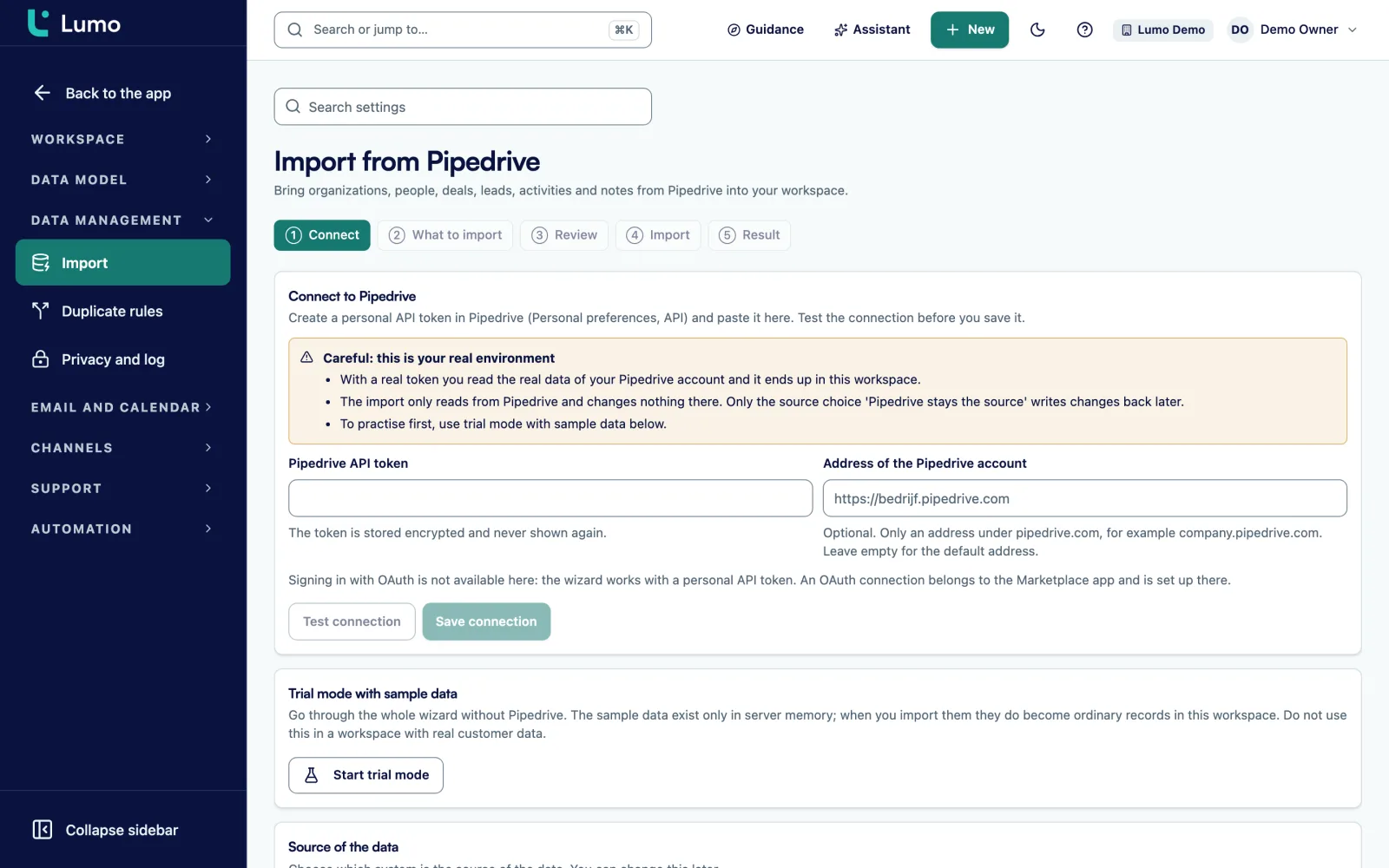
The wizard has six steps, and nothing is written until the Import step. Only an owner or admin of the workspace can use it.
- Connect: you link Pipedrive with a personal API token, which Lumo stores encrypted.
- What to import: you pick the object types, what happens to records deleted in Pipedrive, the default country code for phone numbers and how many records each request fetches, from 1 to 500.
- Trial run: Lumo reads everything and writes nothing, neither in Lumo nor in Pipedrive.
- Review: you see the counts per type and a block with risks.
- Import: the real import runs in the background. If it gets interrupted, it picks up where it stopped.
- Result: the Pipedrive and Lumo counts sit side by side.
The import screen in Lumo
The Review step shows per type how many records come across and which risks there are. Only then does the real import start.
What happens to your Make scenarios and CloudTalk?
Integrations do not come across by themselves. A Make scenario that runs on Pipedrive today needs rebuilding. There is no ready-made Lumo app in Make. Lumo does have a REST API and signed outgoing webhooks, so you use the Make HTTP and webhook modules with an API key. The scenario itself can stay. Only the steps that read from or write to Pipedrive point to Lumo afterwards.
In Lumo, CloudTalk links calls to the person, the organisation and the deal, with recording, transcript and summary. A call activity that was already logged through Pipedrive is taken over by the import, so it does not show up twice.
The Pipedrive Scheduler and other booking tools are replaced by the Lumo meeting planner. It has a booking page, checks your availability in Google Calendar and creates a Google Meet link.
Before you start, list every integration that runs on Pipedrive today. In practice that is the part people underestimate most.
Does my email history come across?
Not from Pipedrive. Mail comes from your own mailbox. Connect Gmail and Lumo pulls in mail with known contacts. By default it goes back 90 days, and you can set it anywhere from 1 to 3,650 days.
If your team works in Outlook or Microsoft 365, there is no sync yet. You use a personal BCC address or forward mail by hand. That is a reason to wait if everyone works in Outlook.
Lumo as the source, or does Pipedrive stay the source?
After the import you pick one of two modes, and you can change it later.
If Lumo is the only source, nothing goes back to Pipedrive. Until you cancel Pipedrive, changes made there can still come in.
If Pipedrive stays the source, changes from Pipedrive come in through a sync connection, with an extra check every 15 minutes. What you change in Lumo on activities, notes, deals and leads goes back to Pipedrive. So support can move first, and sales later.
Clean up duplicates first
Any Pipedrive that has run for a few years has duplicate people and organisations. In Lumo an email address belongs to one person. If several people share an address, the first one gets it and the rest goes into the duplicates queue.
Automatic merging is off by default and asks for confirmation. Every merge can be undone, and after 5 failed merges the process stops by itself. Clean up before the team starts working in Lumo. Why that saves so much is in our piece on CRM data migration.
The playbook for the switch
You can run the import on a Tuesday afternoon. The team switches at a fixed moment. Lumo describes an example of a 14-person team, with two to three weeks of preparation and a week of running both systems side by side. It is an example, not a client case. We work to the same rhythm:
- Two to three weeks ahead: decide which pipelines and fields you keep, list your integrations and add every colleague to Lumo.
- Same period: run the first trial run and resolve the risks from the Review step.
- The week before: run the real import and clean up duplicates. Then train the team on its own data.
- Friday: nobody changes anything in Pipedrive any more. Check the counts and spot check ten open deals.
- Monday: everyone works in Lumo. Keep Pipedrive open for a while to check things.
How long does a switch take?
The import itself depends on the number of records and how many records each request fetches. Lumo gives no fixed duration, and neither do we. After a trial run on your data we give you a number.
Most of the lead time of the whole project sits in the preparation: choices about pipelines and fields, rebuilding integrations and training. A small setup without integrations is done sooner than one with ten Make scenarios. That is why we deliberately give no table per team size.
Do it yourself or outsource it
The wizard is part of the product and you can run it yourself. If you outsource it, Sales Surge runs the trial runs, the import, the cleanup, the integration rebuild and the training.
A mix works too, for example setting up yourself and outsourcing only the migration. How that runs and what it costs is on Lumo implementation.
Frequently asked questions
Will I lose data when I switch?
The trial run shows what comes across without writing anything. The result screen then puts the Pipedrive and Lumo counts side by side. The import only reads from Pipedrive and changes nothing there, except in the mode where Pipedrive stays the source. Files and automations do not come across, so you move those separately. Your Pipedrive account stays until you cancel it.
Do my custom fields come across?
Yes. Custom fields come across as custom fields in Lumo. The import even creates fields that are used in your records but missing from the Pipedrive field list. Do check beforehand which fields you actually use. A switch is the moment to leave behind the fields nobody fills in.
What happens to my Make scenarios?
They do not come across by themselves. A scenario that runs on Pipedrive today needs rebuilding. There is no ready-made Lumo app in Make, so the steps that read from or write to Pipedrive go through the HTTP module to the Lumo REST API or webhooks afterwards. The rest of the scenario can stay as it is. List every integration beforehand, because this is the part people underestimate most.
Does my email history come across?
Not from Pipedrive. Connect Gmail and Lumo pulls in mail with known contacts, 90 days back by default and adjustable up to 3,650 days. Outlook and Microsoft 365 do not sync yet. In that case you use a personal BCC address or forward mail by hand.
Can I run the import twice?
Yes. Running it again creates no duplicates, so you can do a trial import first and the real one later. An interrupted import carries on with Resume, from the point where it stopped. That makes it safe to start the import outside working hours and let it run.
Can part of the team stay in Pipedrive?
Yes, in the mode where Pipedrive stays the source. Changes in Pipedrive flow in, with an extra check every 15 minutes. Changes to activities, notes, deals and leads in Lumo are written back to Pipedrive. So support can switch first and sales later.
How long does an import take?
It depends on the number of records and how many records you fetch per request. Lumo gives no fixed duration, and neither do we. After a trial run on your data we give you a number. The import runs in the background, so you do not have to watch it.
What does a switch to Lumo cost?
Lumo has no fixed price per user on its site. After a demo you get a quote. The price depends on the number of users, the modules you switch on and whether you hand the setup and migration to Sales Surge. Users and modules are listed separately on the quote. We bill the implementation per phase, before that phase starts.