In short
Lumo CRM is the CRM for B2B teams that Sales-Surge B.V. in Amstelveen builds and delivers. Pipeline, quotes, helpdesk and campaigns work on the same customers in one database. You switch fourteen modules on or off per workspace. Our own team works in it. A mobile app, an Outlook integration and SSO are not there yet.
Source: lumoheaven.com, checked on 16 November 2026.As of: 16 November 2026
In this article
- What is Lumo CRM?
- How the modules fit together
- Your day starts on the Today screen
- Pipeline and leads
- Mail and calendar from Gmail
- Quotes with digital signing
- Helpdesk and customer health
- Calling in a cadence
- Data quality rules and duplicates
- Your agents work in the same data
- An AI assistant that asks first
- Which tools does Lumo work with?
- Where is the data, and how is it secured?
- Who is Lumo for, and who is it not for?
- Frequently asked questions
What is Lumo CRM?
Lumo CRM is a CRM for B2B teams, built and delivered by Sales-Surge B.V. in Amstelveen, the Netherlands. Sales, service and marketing work on the same customers in one database, with fourteen modules you switch on or off per workspace.
The difference with a CRM that is only a pipeline is what sits next to it. Quotes with e-signing, a helpdesk with deadlines, campaigns and cadences are part of the same product. So there are no separate tools that each keep their own version of the customer.
Lumo runs in the browser, in English and Dutch. There is no app for iOS or Android. Who Lumo fits and who it does not is further down this article.
How the modules fit together
Every module below works on the same people, organizations and deals. Why Lumo chose that, and when it beats separate tools, is in why Lumo CRM is different.
Your day starts on the Today screen
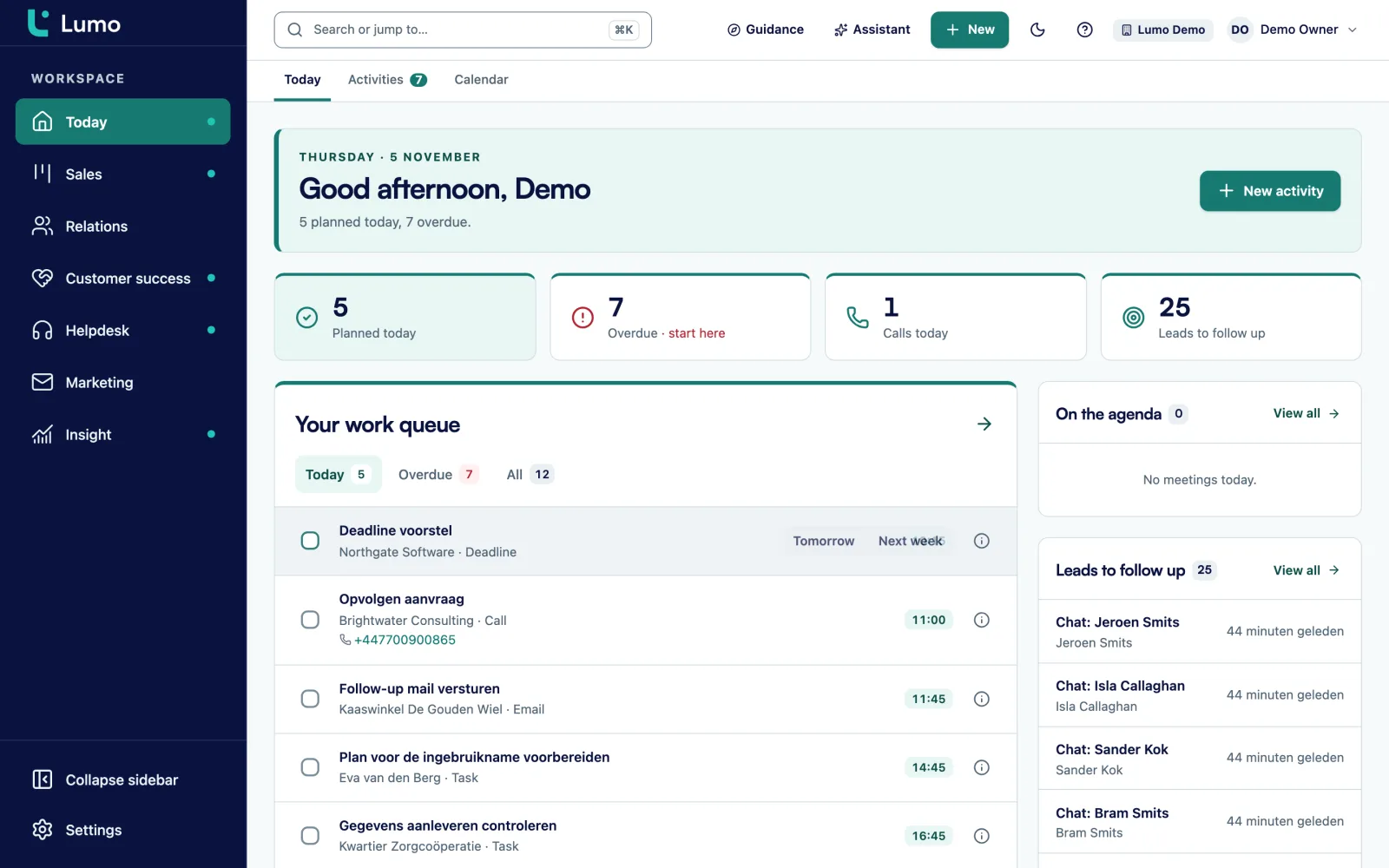
You open Lumo and see what today asks of you. Tasks, leads waiting for follow-up, deals sitting in a stage for too long and tickets whose response time is nearly up.
That screen makes nothing up. A deal is on it because it has been in its stage longer than you set. A ticket is on it when 75 percent of the response time has passed.
Pipeline and leads
Every stage has its own win probability and a number of days after which a deal goes stale. The board shows the number of deals and the weighted value per stage.
Products on a deal set the deal value. Per line you set a discount and a frequency. A lost deal asks for a reason, so later you see why you lose.
Leads have their own inbox. A lead becomes a deal exactly once. More on pipeline management in Lumo.
A lead score you can follow
Every signal adds to the score of a lead. Think of a call campaign or a form. In this example a lead is warm from 5 points and hot from 15.
Mail and calendar from Gmail
Connect your Gmail and mail with known contacts lands on the right person and deal by itself. Mail with people who are not in the CRM, Lumo does not store.
Google Calendar syncs both ways. If you work in Outlook or Microsoft 365, that integration is not there yet. Until then you use a personal BCC address.
Quotes with digital signing
You create a quote on the deal, with the deal products as lines. The customer signs through a link, with a six digit code from their mail.
It is a typed name with a mail code and no qualified electronic signature. The quote and the signing page are in Dutch today, even when you use Lumo in English. More on quotes and e-signatures.
Helpdesk and customer health
Tickets come in from a mailbox or the customer portal. They sit on the same customer as your deals, with a deadline per priority.
Every organisation has a customer health score from 0 to 100, based on the tickets of the last 90 days. So nobody calls about an upsell while a complaint is still open.
Calling in a cadence
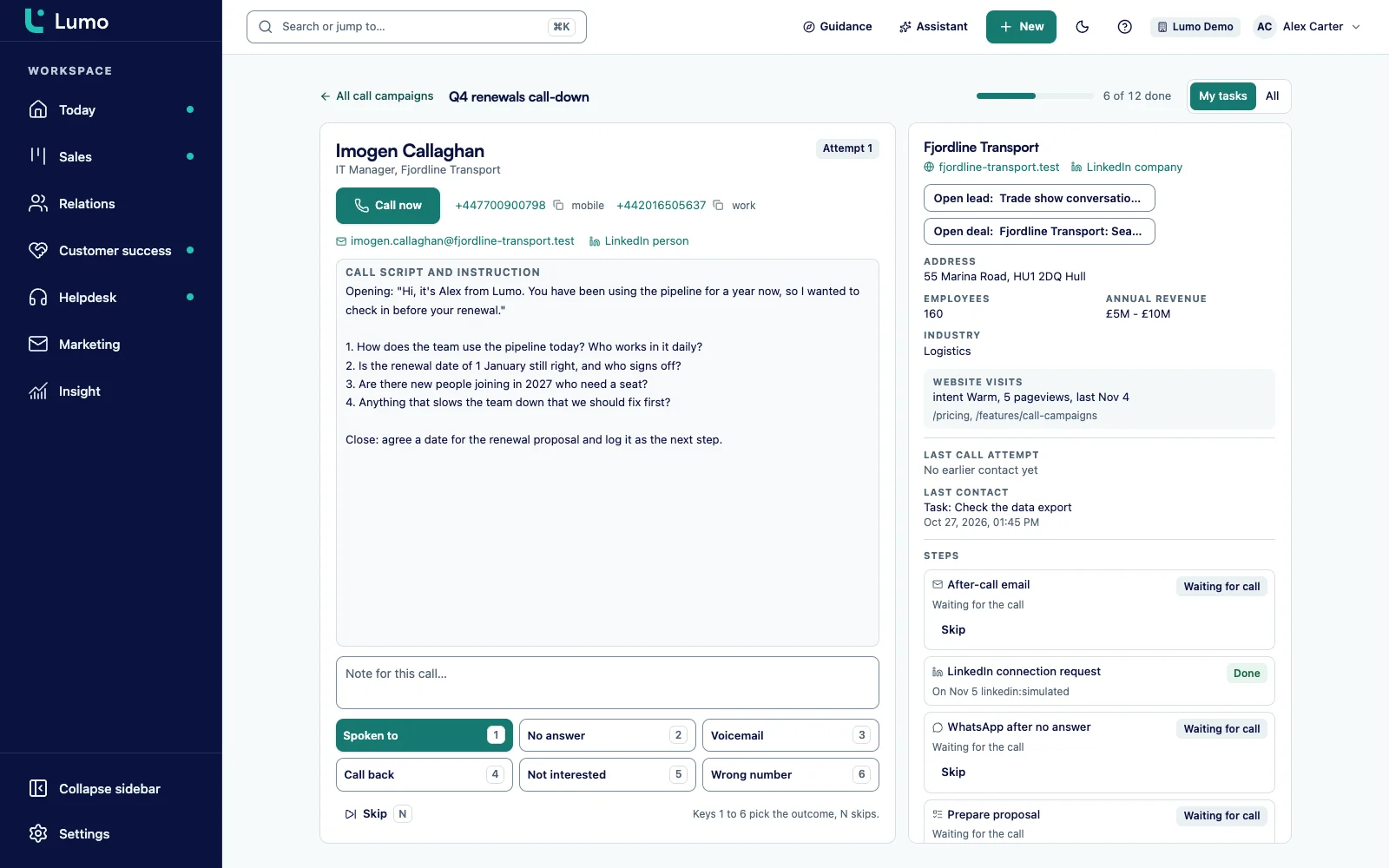
In call mode you work through a list with the prospect next to you. You pick an outcome and the cadence sets up the next step. That might be a mail or a task.
Campaign templates are HTML, without an editor where you drag blocks around. If your growth runs on landing pages, a marketing platform fits better.
A call lands on the timeline
After the call it sits on the customer timeline. The mail and the notes sit next to it.
Data quality rules and duplicates
A data quality rule can warn you or block the save. A deal without a close date gets a warning. A lost deal without a reason is refused.
Duplicates go into a queue with a score per pair. You pick the winner per field, and every merge can be undone. More on duplicate management.
Your agents work in the same data
Your own AI agents talk to the same people and deals as your team, through the REST API and the MCP server. What an agent records shows up on the customer card right away.
How keys, rights and limits for agents work is covered in why Lumo CRM is different. More on headless CRM and AI agents.
An AI assistant that asks first
The AI assistant searches and updates records. It also builds an automation or report for you. It stays off until an admin switches it on.
It works with your role and permissions. Anything that goes out waits for your approval. Want Lumo set up for you, read how a Lumo project runs.
Which tools does Lumo work with?
Lumo connects to Gmail, Google Calendar and CloudTalk without code. Calls from CloudTalk land on the person, the organisation and the deal, with recording, transcript and summary. With your own Apollo account, Lumo fills empty fields.
For everything else there is a REST API, signed webhooks and an MCP server. There is no ready-made app in Make or Zapier. There you use the HTTP and webhook modules with an API key.
If you come from Pipedrive, there is an import wizard. Other CRMs and spreadsheets Sales Surge moves across with a field mapping and a dry run first. How the import runs is in switching from Pipedrive to Lumo.
Where is the data, and how is it secured?
The database sits in London. Workspaces are separated at database level and there is a backup every day.
You log in with email and password plus two factor authentication. There are fixed roles, from owner to reader, and you can create your own. An audit log records who changes what. There is no SSO today. If your IT team requires it, Lumo is not the right choice yet.
Who is Lumo for, and who is it not for?
Lumo fits B2B teams with a sales process that fits a pipeline and that want sales, service and marketing on one customer view. Think software companies, agencies, professional services and wholesalers.
It fits less well if your growth runs on landing pages, if your team mostly works on the road or if everyone lives in Outlook. If you only work a pipeline and your integrations hold up, a well set up Pipedrive is often enough. The comparison is in Lumo, Pipedrive or HubSpot.
Frequently asked questions
Who is Lumo built for?
For B2B teams that sell through a pipeline and want service and marketing to run on the same customers. It is a weaker fit if your team mostly works on the road, because there is no iOS or Android app yet. If everyone lives in Outlook, or IT requires SSO, Lumo is not the right pick today either. None of those three exist yet.
Do I have to take every module?
No. Lumo has fourteen modules you switch on or off per workspace. What is off disappears from the menu and from the Today screen. So you can start with sales and switch on the rest later. The modules you switch on count toward the price and appear as separate lines on the quote. Start with fewer modules and the quote has fewer lines.
What does Lumo cost?
There is no fixed price per user on the site, and no starting price either. The price depends on the number of users, the modules you switch on and whether you hand the setup and migration to Sales Surge. Integrations and training count too. After a demo you get a quote, with users, modules and implementation listed separately.
Can I try Lumo first?
Yes. You request a trial workspace and we set it up for you, so you can work with your own process. You cannot create an account yourself. That is deliberate, because an empty workspace without pipelines and fields says little about how Lumo works for your team.
Is Lumo an alternative to Pipedrive or HubSpot?
For some teams it is. Lumo puts sales, service and marketing in one database, where with Pipedrive you often run separate tools next to it. For a team that only works a pipeline, Pipedrive is often enough. For growth that runs on landing pages, a marketing platform like HubSpot fits better. The comparison per team is in a separate article.
Where is Lumo data stored?
The database sits in London, in the United Kingdom. Workspaces are separated at database level, so one customer never sees another customer's data. There is a backup every day. You log in with email, password and two factor authentication. SSO is not available yet.
Does Lumo work with Gmail and Outlook?
With Gmail, yes. Mail with known contacts lands on the right person and deal by itself, and Google Calendar syncs both ways. With Outlook and Microsoft 365 not yet, that integration is planned. Until then you use a personal BCC address, which works with any mail program.
Does Lumo have an API?
Yes. Lumo has a REST API, signed webhooks and an MCP server for AI agents. Every key has its own read or write rights and an expiry date. There is no ready-made app in Make or Zapier. You connect those through their HTTP and webhook modules with an API key.